3年ぶりにスクリプトを修正。
動くようになったので、メモがてら公開
VVNormal : 効果
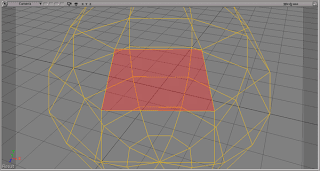
選択したコンポーネントを正面に向けるようにカメラを移動します。
Sorce
# VVNormal
#
# v0.1 2014 02 04 とりあえず、UserCameraでもOK
# v0.0 2011 06 04 Cameraには対応するもUserCameraだとNG

SIZE_RETIO = 0.4
BASE_CAMLENGTH = 50

from win32com.client import constants as c
import math
app = Application
log = app.Logmessage
debug = True

#ログの表示を消す
cmdLog = app.Dictionary.GetObject( "preferences.scripting" )
cmdLog.cmdlog.value = False


def dlog(in_value):
 if debug:
  log(in_value)


#ポリゴンのノーマルの平均を算出しノーマライズ
def getPolyAverageNormal(oColl, m3):
 NA = oColl.NormalArray
 Nx = Ny = Nz = 0
 for i in range(len(NA[0])):
  Nx += NA[0][i]
  Ny += NA[1][i]
  Nz += NA[2][i]
 nV = XSIMath.CreateVector3(Nx,Ny,Nz)
 if nV.Length() <= 0.01:
  nV.Set(0,0,1)
 nV.NormalizeInPlace()
 nV.MulByMatrix3InPlace(m3)
 return nV


#Cameraの注視点を取得
def getCamInterestPos(oColl, m):
 #CameraのInterestを選択したポリゴンのBBoxの中央に
 pnts = oColl.NeighborVertices(1)
 xp = []
 yp = []
 zp = []
 for pnt in pnts:
  pos = pnt.Position
  pos.MulByMatrix4InPlace(m)
  xp.append(pos.X)
  yp.append(pos.Y)
  zp.append(pos.Z)
 xplen = abs( max(xp)-min(xp) )
 yplen = abs( max(yp)-min(yp) )
 zplen = abs( max(zp)-min(zp) )
 inPos = XSIMath.CreateVector3(xplen * 0.5 + min(xp) ,yplen * 0.5 + min(yp) , zplen * 0.5 + min(zp) )
 return inPos


def main():
 dlog("-----main-----")
 userCam = True

 #カメラの取得
 cam = getActiveCamera()
 dlog("CamName : " + str(cam.name))
 cons = cam.Kinematics.Constraints
 log(cons.count)
 for con in cons:
  if con.Type == 'dircns':
   cameraIns = con.Constraining(0)
   userCam = False
   break;
 if app.Selection != None:
  if app.Selection(0).Type != "polySubComponent":
   dlog("PolyMode")
  elif app.Selection(0).Type != "edgeSubComponent":
   dlog("edge")
  elif app.Selection(0).Type != "pntSubComponent":
   dlog("pnt")
  else :
   return
 else:
  return

 oSel = app.Selection(0)
 oSub = oSel.SubComponent
 oObj = oSub.Parent3DObject
 oColl = oSub.ComponentCollection
 m = XSIMath.CreateMatrix4()
 m3 = XSIMath.CreateMatrix3()
 oObj.Kinematics.Global.Transform.GetMatrix4(m)
 oObj.Kinematics.Global.Transform.Rotation.GetMatrix3(m3)
 im = XSIMath.CreateMatrix4()
 im.Invert(m)

 #注視点を取得
 inPos = getCamInterestPos(oColl, m)

 #Normalを取得
 nV = getPolyAverageNormal(oColl,m3)

 oTrans = XSIMath.CreateTransform()

 #UserCamでなければ
 if userCam == False:
  cameraIns.Kinematics.Global.Transform = oTrans
  oTrans.SetTranslation(inPos)

 #ビューマトリクスから、Xの長さYの長さを算出
 vm = createViewMatrix(nV,inPos)
 m.MulInPlace(vm)
 pnts = oColl.NeighborVertices(1)
 xp = []
 yp = []
 for pnt in pnts:
  pos = pnt.Position
  pos.MulByMatrix4InPlace(m)
  xp.append(pos.X)
  yp.append(pos.Y)
 xLength = abs( max(xp)-min(xp) )
 yLength = abs( max(yp)-min(yp) )

 #カメラの画角より、最適な距離を算出。 inX inY in割合
 camLength = BASE_CAMLENGTH
 if xLength > 0.01 and yLength > 0.01:
  camLength = getCameraLength(cam, xLength, yLength, SIZE_RETIO)

 #カメラのポジションに適用
 camPos = XSIMath.CreateVector3()
 nV.ScaleInPlace( camLength )
 camPos.Add(inPos,nV)

 if userCam :
  dlog("UserCamera Mode")

  #距離の指定
  cam.interestdist.Value = camLength

  oTrans.SetTranslation(camPos)
  oRot = XSIMath.CreateRotation()
  vm.InvertInPlace()
  oTrans.SetMatrix4(vm)
  app.SetValue(cam.FullName + ".kine.global.rotx", oTrans.RotX, "")
  app.SetValue(cam.FullName + ".kine.global.roty", oTrans.RotY, "")
  app.SetValue(cam.FullName + ".kine.global.rotz", oTrans.RotZ, "")
  app.SetValue(cam.FullName + ".kine.global.posx", camPos.X, "")
  app.SetValue(cam.FullName + ".kine.global.posy", camPos.Y, "")
  app.SetValue(cam.FullName + ".kine.global.posz", camPos.Z, "")

 else :
  dlog("CameraMode : Moved")
  oTrans.SetTranslation(camPos)
  cam.Kinematics.Global.Transform = oTrans

 dlog("-----finish-----")

 return

#アクティブなカメラを取得
def getActiveCamera():
 oL = app.DeskTop.ActiveLayOut

 #デフォルトビューのチェック
 oV = oL.views("vm")
 abcd = oV.GetAttributeValue("viewportundermouse")
 if oV.Views(abcd).Type == 'Viewer':
  ActiveView = oV.GetAttributeValue("activecamera:" + abcd)
  log(ActiveView)
  if (ActiveView =="User") or (ActiveView =="Top") or (ActiveView =="Front") or (ActiveView =="Right"):
   cam = app.GetValue("Views.View" + abcd + "." + ActiveView + "Camera")
  else:
   cam = app.GetValue(ActiveView)

 #ビューマネージャーにある、オブジェクトビューのチェック
 num = 0
 for i in range(4):
  if oV.Views(i).Type == 'Object View':
   num += 1
 log("ObjectViewCount : " + str(num))
 if oV.Views(abcd).Type == 'Object View':
  ActiveView = oV.Views(abcd).GetAttributeValue("Camera")
  ViewName = oV.Views(abcd).FullName
  log(ActiveView)
  log(ViewName)
  if ActiveView == "default":
   cam = app.GetValue("Views.View" + str(num) + ".UserCamera")
  else:
   cam = app.GetValue(ActiveView)

 #フローティングのオブジェクトビューの対応
 for x in oL.Views:
  if x.Type == 'Object View':
   log(x)
   ActiveView = x.GetAttributeValue("Camera")
   if ActiveView == "default":
    cam = app.GetValue("Views.View" + str(num) + ".UserCamera")
   else:
    cam = app.GetValue(ActiveView)
 return cam

#画角と長さより焦点からのカメラの距離を算出
def getCameraLength(inCamera, inX, inY, inPercnet):
 cam = inCamera
 x = inX
 y = inY
 aspect = cam.aspect.Value
 fov = cam.fov.Value
 fovtype = cam.fovtype.Value #if 1:Horizontal

 fov = XSIMath.DegreesToRadians(fov)

 #Xでの算出
 xCos =  ( 0.5 * x ) / math.tan( 0.5 * fov )
 #Yでの算出
 yCos = ( 0.5 * y ) / math.tan( 0.5 * fov ) * aspect

 if xCos > yCos:
  length = xCos
 else:
  length = yCos

 length = length / inPercnet
 return length

#ビューマトリックスの作成
def createViewMatrix(inNormalVect,inInsPos):
 nv = inNormalVect
 m = XSIMath.CreateMatrix4()
 upv = XSIMath.CreateVector3(0,1,0)
 if nv.Dot(upv) > 0.9:
  m.Set(1,0,0,0,   0,0,-1,0, 0,-1,0,0, inInsPos.X, inInsPos.Y , inInsPos.Z , 1)
  m.InvertInPlace()
  return m
 u = XSIMath.CreateVector3()
 v = XSIMath.CreateVector3()
 w = XSIMath.CreateVector3()

 w.Scale(-1 , nv)
 w.NormalizeInPlace()

 u.Cross(upv,w)
 u.NormalizeInPlace()

 v.Cross(u,w)
 v.NormalizeInPlace()

 m.Set(
 u.X , u.Y , u.Z , 0 ,
 v.X , v.Y , v.Z , 0 ,
 w.X , w.Y , w.Z , 0 ,
 inInsPos.X, inInsPos.Y , inInsPos.Z , 1
 )
 m.InvertInPlace()
 return m

main()
備考
Softimageは、自分で制作するカメラと、
シーンにあらかじめ配置してあるビュー用のカメラがあります。
ビュー用のカメラは、注視点ようのNullがなかったので、
場合分けが出来てなかったですが。
改良して使えるようにしてみました。
付け焼き刃的に拡張したので、
中身はUNKです orz


